This is the Setup Guide for the Restrict Paid Content extension for GetPaid.
Overview
Restrict Paid Content does not add any main GetPaid settings. Instead, it provides a block and a shortcode to restrict content. Once installed and active, you will see a new block “GP > Restrict Paid Content“.
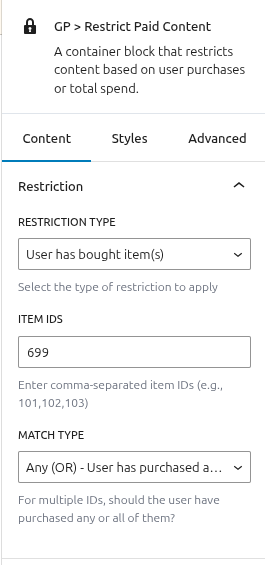
How it Works?
The block is a container block, meaning you can add other blocks as child blocks. To restrict content, simply add the content as child blocks.
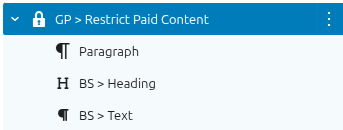
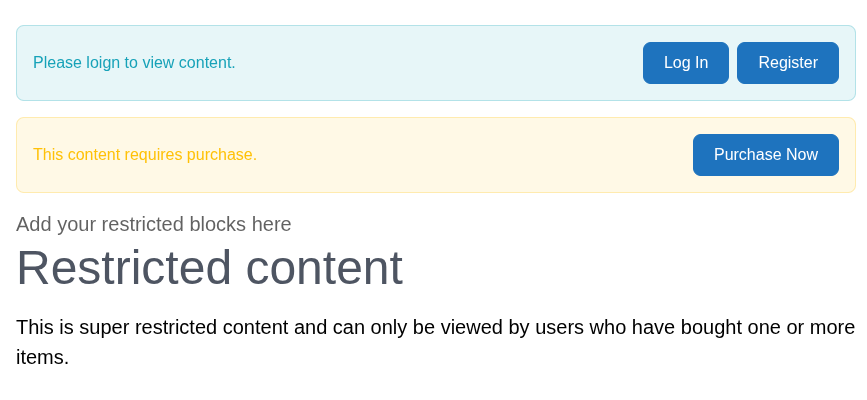
Any content inside can be restricted. In the editor, you will see a basic preview. This preview shows logged-out messages and logged-in messages, which are editable in the settings.
Shortcode
To use this as a shortcode you can follow the below example:
[getpaid_restrict_paid_content restriction_type='bought_item'  item_ids='13'  match_type='any'  logged_out_message='Login to view'  show_login_button='true'  login_button_text='Log In'  show_register_button='true'  register_button_text='Register'  logged_out_show_excerpt='true'  logged_out_excerpt_length='200'  logged_out_excerpt_position='before'  restricted_message='This content requires purchase'  show_buy_button='true'  buy_button_text='Purchase Now'  restricted_show_excerpt='true'  restricted_excerpt_length='200'  restricted_excerpt_position='before'  ]
This content is restricted.
[/getpaid_restrict_paid_content]